

A language model knows what was in its training data and nothing else. It does not know today’s date, your database, or how many repositories a GitHub user has right now. Tool calling closes that gap: you hand the model a set of C# methods it is allowed to invoke, and when a question needs one, the model asks for it, you run it, and the result goes back into the conversation.
Microsoft.Extensions.AI makes this almost free. Any method becomes a tool via
AIFunctionFactory.Create, and the UseFunctionInvocation middleware runs the
whole call-and-return dance for you.
The happy path is four lines of setup. Most of this article is about the part nobody warns you about: what happens when the model calls your tool wrongly.
The series
| # | Article | What you build |
|---|---|---|
| 1 | Why Microsoft.Extensions.AI exists | The abstraction model, the package map, a local Ollama setup |
| 2 | Your first IChatClient | Streaming chat, DI registration, conversation history, system instructions |
| 3 | Tool calling with AIFunctionFactory | Letting the model call your C# methods |
| 4 | Unit testing and evaluating LLMs | Deterministic tests around a non-deterministic component |
| 5 | Ingesting data with IEmbeddingGenerator | PDF extraction, chunking, vectorisation |
| 6 | Vector stores and completing the RAG loop | VectorStoreCollection, SQLite-vec, similarity search, grounded prompts |
| 7 | Generating images with IImageGenerator | Text-to-image, and how to test a generated image |
| 8 | On-device LLMs with Microsoft.Maui.Essentials.AI | Apple Intelligence, NLEmbeddingGenerator, capability probing |
| 9 | Cloud LLMs: Microsoft Foundry and Amazon Bedrock | Provider selection, credentials, resilience, hybrid routing |
The full source code of this series is available on GitHub.
A tool is just a method
No attributes are required, no interface, no base class. The simplest possible
version of GitHubServices.cs:
public class GitHubServices(GitHubClient client)
{
    readonly GitHubClient _client = client;

    [Description("Gets the number of public repositories owned by a GitHub user.")]
    public async Task<int> GetRepositoryCount(
        [Description("The GitHub login, e.g. 'erossini'")] string userName)
    {
        var user = await _client.User.Get(userName);
        return user.PublicRepos;
    }
}
The [Description] attributes are optional but do real work: they become the
JSON-schema descriptions the model reads to decide which tool to call and
what arguments to pass. Vague descriptions are the number-one reason a model
picks the wrong tool or fills in a parameter wrongly. Treat them as prompt, not
documentation.
Hold onto that listing: we will come back and harden it, because as written it will take your process down.
Registering tools
Tools live on ChatOptions.Tools. AIFunctionFactory.Create reads a method’s
signature — name, parameters, return type, descriptions — and produces an
AIFunction. From Program.cs:
var options = new ChatOptions
{
    // Tool calling is a structured-output task, not a creative one. A low
    // temperature makes the model far less likely to invent an argument.
    Temperature = 0,

    Tools =
    [
        AIFunctionFactory.Create(gitHub.GetOwnerUserName),
        AIFunctionFactory.Create(gitHub.GetUserBio),
        AIFunctionFactory.Create(gitHub.GetRepositoryCount),

        // A lambda works too, but you must name and describe it -- there is no
        // method metadata to infer from.
        AIFunctionFactory.Create(
            () => "erossini/CSharpExtensionAI",
            name: "GetMostPopularLibrary",
            description: "The library CSharpExtensionAI has millions of downloads on NuGet"),

        // Tools don't have to hit the network -- the current time is the classic
        // thing a model cannot know on its own.
        AIFunctionFactory.Create(
            () => DateTimeOffset.UtcNow.ToString("O"),
            name: "GetCurrentUtcTime",
            description: "Gets the current UTC time in ISO-8601 round-trip format")
    ]
};
Instance methods, static methods and lambdas all work. For a lambda there is no
signature to mine, so you supply name and description yourself.
A word on Temperature
If you have not met this setting before: a model does not really “pick” the next token, it produces a probability for every token in its vocabulary. Something like:
erossini    0.71
the         0.12
currentUser 0.04
...
Temperature controls how much attention is paid to the long tail of that
list. At 0 the model always takes the highest-probability token — greedy
decoding. Raise it and the distribution flattens, so lower-ranked tokens get a
real chance of being chosen. Around 0.7–1.0 (the usual default) that is
exactly what you want for prose: it is where variety and surprise come from. Ask
the same question twice and you get two differently-worded answers.
For tool calling you want none of that. The tool name has to be spelled exactly
right and the argument has to be the correct value, not an interesting one.
There is no creative upside to occasionally sampling currentUser when
erossini scored 0.71. So set it to zero:
var options = new ChatOptions
{
    Temperature = 0,
    Tools = [ /* ... */ ]
};
Two honest caveats. First, Temperature = 0 is not a determinism switch — I
still got different answers from identical runs, because greedy decoding only
removes the sampling randomness, not floating-point and batching effects in the
inference engine. ChatOptions.Seed helps further if your provider honours it.
Second, it does not fix a model that is guessing. If currentUser is what the
model believes most strongly, temperature 0 makes it pick that more
reliably. Temperature narrows the spread of answers; it cannot improve the one
at the top. That distinction matters later in this article.
The middleware does the loop
This registration is what makes tools actually execute:
builder.Services.AddChatClient(_ => new OllamaApiClient(
                                   new HttpClient
                                   {
                                       BaseAddress = new Uri("http://127.0.0.1:11434"),
                                       Timeout = TimeSpan.FromMinutes(10)
                                   },
                                   "qwen3:1.7b"))
       .UseFunctionInvocation(configure: c => c.IncludeDetailedErrors = true);
Under the hood, one “turn” is really several round-trips:
- You send the prompt plus the tool definitions.
- The model replies with a
FunctionCallContent— “callGetRepositoryCountwithuserName: erossini”. UseFunctionInvocationfinds the matchingAIFunction, invokes it, and appends aFunctionResultContentto the messages.- It calls the model again with the result included.
- The model produces the final natural-language answer.
Without UseFunctionInvocation, step 3 never happens — you get a response
object full of FunctionCallContent and nothing runs. That is the most common
“why won’t my tools fire” mistake.
Two details in that registration are not decoration:
- The explicit
HttpClienttimeout.HttpClientdefaults to 100 seconds. A single tool-calling turn is several model round-trips back to back, and the first one also pays for loading the weights. On CPU that blows past 100 seconds easily, and what you get is aTaskCanceledExceptionwhose message talks aboutHttpClient.Timeoutfrom somewhere deep insideOllamaSharp— it looks like a bug in your code, not a timeout. Give a local model room. IncludeDetailedErrors = true. When your tool throws, the model otherwise receives the string"Error: Function failed."and nothing else, which it cannot act on. With this flag it sees the real exception message and has a chance to correct itself.
From your side it is still one call:
await foreach (var update in client.GetStreamingResponseAsync(messages, options))
    Console.Write(update.Text);
Descriptions are not enough: tell the model to look things up
Here is the first thing that goes wrong. Ask “how many public repositories does
the owner of this app have?” and a small model will reason: I need a username,
I don’t have one, I’ll produce something username-shaped. It sends null, or a
plausible-looking placeholder such as currentUser.
[Description] text says what a parameter is. It does not say that the value
has to be fetched from another tool first. Say that in a system message:
const string systemPrompt =
    """
    You answer questions about this application's owner using the supplied tools.
    When a question mentions "the owner", call GetOwnerUserName first and pass the
    exact value it returns to the other tools. Never invent or guess a username,
    and never answer from memory when a tool can tell you.
    """;

List<ChatMessage> messages =
[
    new(ChatRole.System, systemPrompt),
    new(ChatRole.User, prompt)
];
That one paragraph is the difference between the model chaining
GetOwnerUserName → GetRepositoryCount and the model inventing an argument.
Resist the urge to make it longer. I tried a much more emphatic version — “you
know nothing about any GitHub user, every fact must come from a tool call” —
and the 1.7b model got measurably worse, and started leaking
<final_answer> tags into its output. Small models have a prompt budget. Spend
it on the one instruction that matters.
Two ways a tool call goes wrong
Now harden that first listing. Both of these are real failures I hit with
qwen3:1.7b, and both kill the process.
The model sends an explicit null. Your instinct is to give the parameter a
default:
public async Task<string> GetUserBio(string userName = "erossini") // does not help
This does not work. A C# default value only applies when the argument is
absent. The model does not omit the argument — it sends "userName": null,
which sails straight past the default and into Octokit as
ArgumentNullException: Value cannot be null. (Parameter 'login'). Normalise
the value in the body instead:
static string Resolve(string? userName) =>
    string.IsNullOrWhiteSpace(userName) ? OwnerLogin : userName.Trim();
The model sends a plausible fiction. Mine settled on currentUser, which
produced Octokit.NotFoundException: Not Found — a 404 that escaped the tool
and terminated the app. (Amusingly, currentUser is a real GitHub account, so
that call can also succeed and hand you a complete stranger’s bio. Silent wrong
answers are worse than exceptions.)
A tool result is just text that goes back into the conversation. So return a message the model can act on rather than throwing:
[Description("Gets the public biography text for a GitHub user.")]
public async Task<string> GetUserBio(
    [Description("The GitHub login, e.g. 'erossini'. Call GetOwnerUserName to obtain it -- never invent one. Omit it to use the app owner.")]
    string? userName = null)
{
    var login = Resolve(userName);

    try
    {
        var user = await _client.User.Get(login);
        return user.Bio ?? "(no bio set)";
    }
    catch (NotFoundException)
    {
        return $"There is no GitHub user named '{login}'. " +
               "Call GetOwnerUserName to get the correct login, then try again.";
    }
}
Note what happened to the signature: GetRepositoryCount changed from
Task<int> to Task<string> for the same reason. A typed return is tidier in
C#, but it leaves you nowhere to put “that user doesn’t exist”. The model reads
text either way.
Also notice the parameter description now carries an instruction — “Call GetOwnerUserName to obtain it” — not just a type hint. That is the schema description doing prompt work.
Seeing what the model did
When a tool is not being picked, you need to see the traffic. A non-streaming call exposes every message, including the tool calls and their results:
var traced = await client.GetResponseAsync(messages, options);

foreach (var message in traced.Messages)
foreach (var content in message.Contents)
{
    switch (content)
    {
        case FunctionCallContent call:
            Console.WriteLine($"  -> called {call.Name}(...)");
            break;
        case FunctionResultContent result:
            Console.WriteLine($"  <- returned {result.Result}");
            break;
        case TextContent text when !string.IsNullOrWhiteSpace(text.Text):
            Console.WriteLine($"  =  {text.Text}");
            break;
    }
}
This trace is the single most useful debugging tool in this whole topic, and its real job is not spotting exceptions. It is telling “the model called the tool” apart from “the model made the answer up” — two outcomes that look identical in the chat output, because a fabricated answer is fluent and confident and sits exactly where the real one would.
Run it
# needs a tool-capable model
ollama pull qwen3:1.7b
dotnet run --project 03.ToolCalling
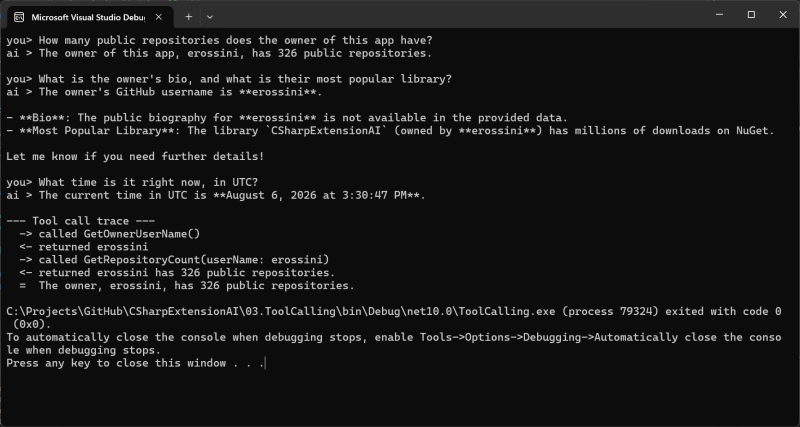
you> How many public repositories does the owner of this app have?
ai > The owner of this app, whose GitHub username is erossini, has 326 public repositories.

--- Tool call trace ---
  -> called GetOwnerUserName()
  <- returned erossini
  -> called GetRepositoryCount(userName: erossini)
  <- returned erossini has 326 public repositories.
  =  The owner, erossini, has 326 public repositories.
Notice the model chained two tools on its own: it did not know the username, so
it called GetOwnerUserName first, then fed that into GetRepositoryCount. You
wrote two small methods; the model did the orchestration.
When the model just makes it up
Everything above is fixable in code. This part is not, and it is the most important thing in the article.
The second prompt in the sample asks two things at once: “What is the owner’s
bio, and what is their most popular library?” With qwen3:1.7b, roughly half
my runs answered like this:
ai > The owner's GitHub username is erossini. Their public bio is:
     "C# Developer | Open Source Contributor | Building powerful .NET solutions."
That bio is fiction. The real one is “Senior .NET Developer / Team Lead –
Looking for permanent roles”. Across six runs the model invented three
different bios, each perfectly plausible. It answered the “most popular library”
half via GetMostPopularLibrary and simply wrote the other half from
imagination — no exception, no error, nothing in the log. Only the trace shows
GetUserBio was never called.
Switching to qwen3 (8b) got it right every time. Two-hop tool chaining is a
model-capability threshold, and 1.7b sits under it. No amount of prompt
engineering moved it; the stronger prompt made it worse.
The catch is speed. Check what you are actually running:
ollama ps
NAME            SIZE_VRAM
qwen3:latest    0
SIZE_VRAM 0 means the model is on CPU. An 8b thinking model on CPU spends
minutes per prompt — and because qwen3 emits a long reasoning block before every
tool call, a multi-tool turn is several of those in a row. That is also the first
thing to blow past the 100-second HttpClient default.
So: 1.7b for a fast loop while you are writing the tools, 8b when you need the answers to be true, and the trace to tell which one you are getting.
Guidance that saves you time
- Describe every tool and parameter. This is prompt engineering, not paperwork. Put instructions in parameter descriptions, not just types.
- Add a system prompt for cross-tool dependencies. Descriptions cannot express “fetch this value from that other tool first”.
- Set
Temperature = 0. Argument selection is not a creative task. - Never let a tool throw. Catch and return a corrective message. An exception that escapes takes the host down; a message lets the model recover.
- Defaults don’t stop
null. A C# default value only fills in an absent argument, never an explicitnull. Normalise inside the method. - Raise the
HttpClienttimeout for local models. 100 seconds is not enough for a multi-turn tool call on CPU. - Keep tools small and single-purpose. One clear verb each beats a do-everything method.
- Not every model calls tools well. Calling one tool and chaining two
are different capabilities.
ollama show <model>liststoolsunder capabilities, but that only tells you it can call one.
What you learned
- Any C# method becomes a tool through
AIFunctionFactory.Create. [Description]attributes steer the model’s choices; a system prompt handles dependencies between tools.UseFunctionInvocationruns the call/return loop; without it nothing executes.- Models send
nulland invented arguments — normalise input and return errors as text instead of throwing. - Walking
response.Messagesreveals what the model called, and more usefully, what it didn’t call before answering anyway.