

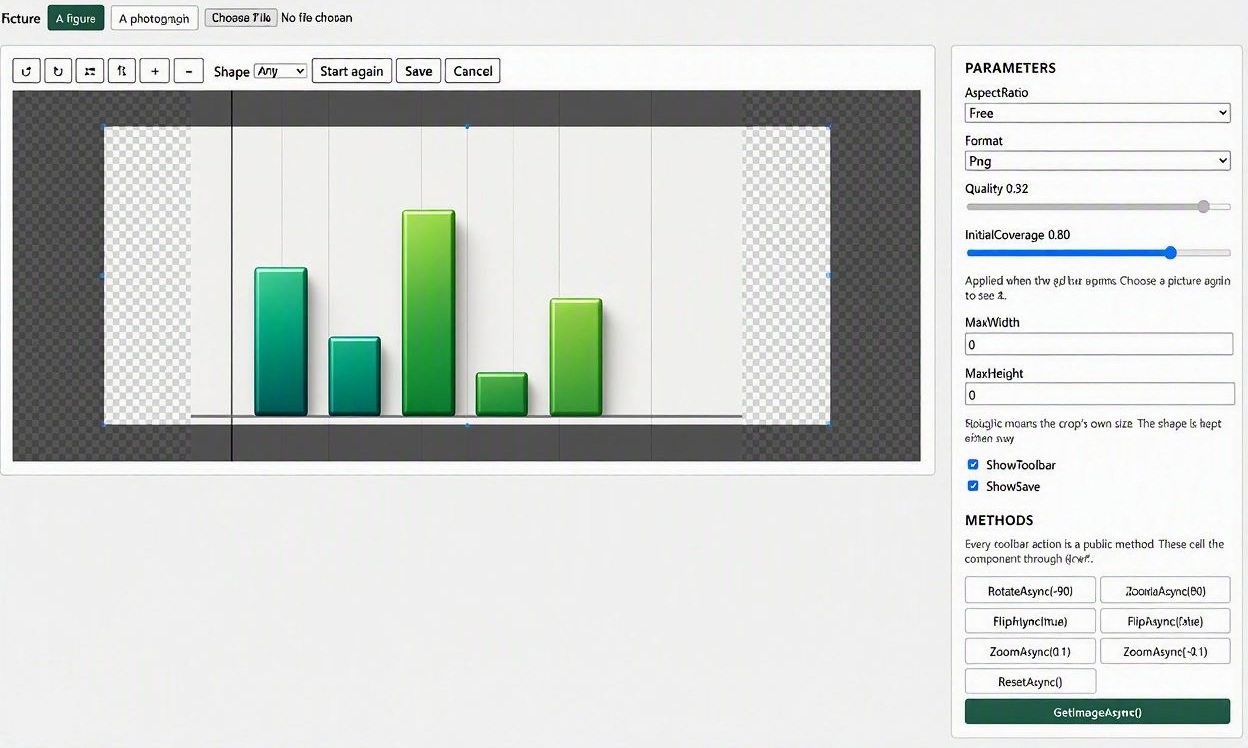
An image editor component for Blazor WebAssembly and Blazor Server with .NET 10. Crop, rotate, flip and scale a picture in the browser, and hand the result back to your own code.
The editor is built on Cropper.js version 2.x, which ships inside the package: nothing is fetched from a CDN at runtime, so the component works on a machine that has never been online and adds nothing to your build.
For more documentation and help with this component, visit the post I created here.
If you like this project and want to support my work, you can buy me a coffee or make a donation. Your support is really appreciated and it helps me to continue to create new projects and to maintain the existing ones.
Install
dotnet add package PSC.Blazor.Components.ImageEditor
Usage
Add the editor to your _Imports.razor:
@using PSC.Blazor.Components.ImageEditor
@using PSC.Blazor.Components.ImageEditor.Enums
@using PSC.Blazor.Components.ImageEditor.Models
There is nothing to add to your index.html, host.html or App.razor. The component imports its own script the first time an editor opens, and loads Cropper.js from the package itself — a page that never shows an editor loads neither.
Add an ImageEditor to a page
<ImageEditor Src="@_address"
             Alt="The picture being edited"
             OnSave="SaveAsync"
             Style="height: 460px;" />

@code {
    private string? _address = "/pictures/figure-1.png";

    private async Task SaveAsync(EditedImage edited)
    {
        await using (edited)
        {
            await using var writing = File.Create("figure-1-cropped.png");
            await edited.Content.CopyToAsync(writing);
        }
    }
}
Give the editor a height. It fills whatever the host gives it, and inside a container with no height it has none. Style="height: 460px;" is the default for that reason.
What you get back
OnSave hands you an EditedImage:
| Member | What it is |
|---|---|
Content |
The picture’s bytes, as a Stream read once, in order |
MediaType |
image/png, image/jpeg or image/webp |
Width, Height |
The size of the crop itself, in pixels — not the size it was shown at |
Length |
How many bytes it holds |
Extension |
The extension the format calls for, with its dot |
FileName(stem) |
That name with that extension |
ReadAllBytesAsync() |
The whole picture in memory, when it has to be held rather than copied on |
The bytes come back as a stream, not as a string, and this matters on Blazor Server. A value returned from JavaScript travels over the SignalR circuit, and a cropped picture is routinely larger than the message size a circuit allows by default. A component returning a data URL would work in WebAssembly, work for small pictures on a server, and fail for large ones with an error about the circuit rather than about the picture. Take what you need from the stream and dispose it; the editor does not hold on to it.
The editor never writes anywhere. Whether the result replaces the picture that was edited, becomes a new one, or is thrown away is your code’s decision — which keeps the component out of your storage and out of your naming.
Drive it from your own buttons
Set ShowToolbar="false" and call the component through @ref. Every toolbar action is a public method.
<ImageEditor @ref="_editor" Src="@_address" ShowToolbar="false" />

<button @onclick="() => _editor!.RotateAsync(90)">Rotate</button>
<button @onclick="() => _editor!.FlipAsync(true)">Flip across</button>
<button @onclick="() => _editor!.ZoomAsync(0.1)">Zoom in</button>
<button @onclick="() => _editor!.SetAspectRatioAsync(ImageAspectRatio.Square)">Square</button>
<button @onclick="() => _editor!.ResetAsync()">Start again</button>
<button @onclick="SaveAsync">Save</button>

@code {
    private ImageEditor? _editor;

    private async Task SaveAsync()
    {
        var edited = await _editor!.GetImageAsync();

        if (edited is not null)
        {
            await using (edited)
            {
                // Yours to store.
            }
        }
    }
}
Hold the crop to a shape
<ImageEditor Src="@_address" AspectRatio="ImageAspectRatio.Wide" />
| Value | Shape |
|---|---|
Free |
Any shape at all (the default) |
Square |
1:1 |
Standard |
4:3 |
Wide |
16:9 |
Photo |
3:2 |
Keep the saved picture small
<ImageEditor Src="@_address"
             Format="ImageFormat.Jpeg"
             Quality="0.8"
             MaxWidth="1600" />
MaxWidth and MaxHeight cap the saved picture without changing its shape. Quality applies to JPEG and WebP and is ignored for PNG. PNG is the default because a crop of a chart or a diagram keeps its lines and its text sharp, where JPEG softens both.
Documentation
Properties
| Property | Type | Default | Description |
|---|---|---|---|
Src |
string? |
null |
The address of the picture to edit. Anything an img can show, including a data URL. |
Alt |
string? |
null |
What the picture is, for a reader who cannot see it. |
Id |
string |
generated | The id of the element the editor is built over. |
Class |
string? |
null |
Classes put on the outermost element. |
Style |
string? |
height: 420px; |
Styles put on the outermost element. Set a height here. |
ShowToolbar |
bool |
true |
Whether the built-in toolbar is shown. |
ShowSave |
bool |
true |
Whether the toolbar offers a save button. |
AspectRatio |
ImageAspectRatio |
Free |
The shape the crop box is held to. |
InitialCoverage |
double |
0.8 |
How much of the picture the crop box covers when the editor opens. |
Format |
ImageFormat |
Png |
The format the edited picture is written in. |
Quality |
double |
0.92 |
The quality of a lossy format, from 0 to 1. |
MaxWidth |
int |
0 |
The widest the saved picture may be; 0 for the crop’s own width. |
MaxHeight |
int |
0 |
The tallest the saved picture may be; 0 for the crop’s own height. |
MaxBytes |
long |
32 MB | The most bytes the host will accept back. |
Texts |
ImageEditorTexts |
English | The words on the toolbar, for a host in another language. |
Methods
| Method | Description |
|---|---|
RotateAsync(int degrees) |
Turns the picture; positive is clockwise. |
FlipAsync(bool horizontal) |
Mirrors the picture left to right, or top to bottom. |
ZoomAsync(double ratio) |
Makes the picture larger or smaller under the crop box. |
SetAspectRatioAsync(ImageAspectRatio) |
Holds the crop box to a shape. |
ResetAsync() |
Puts the picture and the crop box back as they were. |
GetImageAsync() |
Draws what the crop box covers and returns it. |
Events
| Event | Type | Description |
|---|---|---|
OnSave |
EventCallback<EditedImage> |
The save button was pressed, with the edited picture. |
OnCancel |
EventCallback |
The cancel button was pressed. The button appears only where this is set. |
OnError |
EventCallback<ImageEditorErrorEventArgs> |
Something could not be done, with words to show. |
A picture from another origin
A browser will not let a canvas read back a picture fetched from another origin unless that origin allows it, so cropping one will fail when it is saved. Serve pictures from your own host, or proxy them through it.
Demo
ImageEditorDemo in this repository is a Blazor Server app, deliberately: what is most likely to break in a component like this is the way an edited picture comes back over a circuit, and a demo that ran only in WebAssembly would never exercise it.
dotnet run --project ImageEditorDemo