


As developers, we often optimise the frontend: minified assets, compressed images, CDNs, lazy loading… all great practices. But there’s a hidden bottleneck we sometimes forget: the user’s network speed.
While many of us enjoy fibre or 5G, a huge portion of real‑world users still rely on:
- Congested 4G
- Slow 4G
- 3G
- Rural connections
- Mobile devices with a weak signal
In these environments, every kilobyte counts. And one of the most effective backend optimisations is also one of the simplest: response compression.
What Response Compression Does
The idea is straightforward:
- Your API compresses the response (e.g., JSON) before sending it.
- The client automatically decompresses it.
This reduces the payload size and speeds up loading times — especially on slow networks.
Modern browsers already send headers like:
Accept-Encoding: gzip, deflate, br, zstd
So your backend just needs to support compressed responses.
When Compression Makes a Difference
Compression is especially useful when:
- Responses are larger than ~10 KB
- You’re serving public APIs
- Your clients are mobile apps
- Your users are in regions with slow connectivity
It’s less useful for internal microservice‑to‑microservice calls on the same network.
The CPU cost is minimal compared to the performance gains.
How to Enable Gzip in .NET (Modern Minimal API Example)
Here’s a clean, up‑to‑date example for .NET 9/10 using Minimal APIs.
Program.cs
using Microsoft.AspNetCore.ResponseCompression;
using System.IO.Compression;

var builder = WebApplication.CreateBuilder(args);

// 1. Enable response compression
builder.Services.AddResponseCompression(options =>
{
    options.EnableForHttps = true;
    options.Providers.Add<GzipCompressionProvider>();
    options.Providers.Add<BrotliCompressionProvider>();
});

// 2. Configure compression levels
builder.Services.Configure<GzipCompressionProviderOptions>(options =>
{
    options.Level = CompressionLevel.Fastest; // or Optimal
});

builder.Services.Configure<BrotliCompressionProviderOptions>(options =>
{
    options.Level = CompressionLevel.Fastest;
});

var app = builder.Build();

// 3. Activate compression middleware
app.UseResponseCompression();

// 4. Example endpoint
app.MapGet("/products", () =>
{
    var products = Enumerable.Range(1, 500)
        .Select(i => new { Id = i, Name = $"Product {i}" });

    return Results.Ok(products);
});

app.Run();
What This Gives You
- Automatic compression for JSON and other responses
- Support for Gzip and Brotli
- Faster load times on slow networks
- Lower bandwidth usage for mobile users
- Zero changes required on the client side
When a compatible client calls your API, it will receive:
Content-Encoding: gzip
And the browser or mobile app will decompress it seamlessly.
Real‑World Benefits
Compression can reduce payload sizes dramatically — often by 60–90% depending on the data. That means:
- Faster API responses
- Better UX for users with poor connectivity
- Lower data usage on mobile
- Improved performance for large JSON payloads
It’s one of the easiest performance wins you can implement.
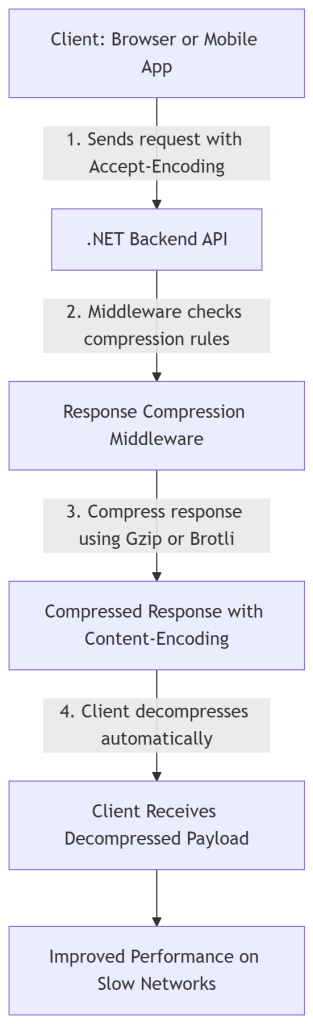
The Diagram
1. The client declares what compression formats it supports. Browsers and mobile apps send:
Accept-Encoding: gzip, br, deflate, zstd
2. .NET checks whether compression should be applied
The middleware evaluates:
- Is compression enabled in the app?
- Does the client support it?
- Is the response compressible?
- Is the payload large enough?
3. The response is compressed
.NET uses the best available provider:
- Gzip → fastest and most compatible
- Brotli → best compression ratio
- None → if client doesn’t support compression
4. The client decompresses automatically
No code needed on the client side — browsers and HTTP libraries handle it.
Wrap up
Response compression is a simple but powerful optimisation that many teams overlook. In a world where not all users have fast or stable internet, enabling Gzip or Brotli in your .NET backend can make a meaningful difference.
If you’re building mobile apps, SPAs, or public APIs, this should be part of your standard performance checklist.