

Introducing the PSC Survey Suite for Blazor: a runtime component, a drag-and-drop visual designer, and bulk importers that all speak the same JSON.
Every Blazor project I’ve shipped in the last few years has eventually needed a form. Sometimes it’s a quick feedback questionnaire. Sometimes it’s an onboarding wizard with a dozen conditional branches. Sometimes it’s a customer survey that product wants to edit without asking a developer.
And every single time, I’ve watched a team either (a) hand-roll the form with <InputText> / <InputSelect> / <EditForm> and re-invent validation, branching, and JSON serialization from scratch, or (b) bolt on a SurveyJS-like JavaScript library and pay for the JS/C# impedance every time a field value needs to cross the bridge.
The PSC Survey Suite is the third option: a native Blazor component set that speaks a strongly-typed Form model, renders 15 element types out of the box, and now ships with a visual designer so non-developers can build the forms themselves.
This post is a tour of what’s in the box and what’s new.
The shape of the thing
At the core sits one small idea: a survey is a Form with a list of IElement. Everything else is details.
var form = new Form {
    Elements = new List<IElement> {
        new Textbox  { Title = "Your name", IsRequired = true },
        new Radiobutton {
            Title = "How did you hear about us?",
            Choices = new List<object> { "Search", "Friend", "Ad" }
        },
        new Rating { Title = "Rate your experience" }
    }
};
Drop that form into the runtime component and you get a complete, validated, three-question survey:
<Survey Form="form"
        ShowDebug="true"
        OnFormSubmitted="HandleSubmit" />
No DI registration. No scripts to add to index.html. No custom CSS file to link. The component ships its own assets via _content/… and injects them on first render.
When the user submits, you get a typed event with both the raw values and a JSON payload:
async Task HandleSubmit(FormSubmittedEventArgs e) {
    await _api.PostAsync("/responses", e.JsonValues);
}
That’s really all you need to know for a small form. The rest of this post is about what happens when “small” isn’t small any more.
15 element types, organised by how people actually use them
Text inputs handle most of what HTML forms already do, plus a few extras:
- Textbox — all 11 HTML input types (text, email, number, date, datetime, month, week, url, tel, password, color) with min/max length.
- Comment — multi-line textarea with configurable row count and character limits.
- HTML — static markup between questions, because sometimes the form needs a paragraph of explanation.
Selection for when the user picks from a set:
- Radiobutton (vertical, horizontal, or “boxed” theme).
- Checkbox for multi-select.
- DropdownList — single or multi-select.
- ImagePicker — grid of images with optional multi-select.
- Switch — a single-boolean toggle, because sometimes “radio with two options” feels wrong.
Scales for the measurement side of a survey:
- Slider with custom tick labels, centre-thumb mode, and configurable range.
- NPS (Net Promoter Score) — 0-10 or 1-11, fixed radio layout.
- LikertSkill — three built-in 5-point scales (Agree, Helpful, Satisfied).
- Rating — stars, configurable max.
Matrix for grid-style questions where every row is evaluated on the same set of columns.
Containers, where things get interesting:
- Panel groups related elements with a shared title and optional background colour. Panels can nest.
- Repeater defines a template that users can clone into multiple rows at runtime — perfect for “tell us about each of your dependents” kinds of questions.
Conditional logic, done simply
Every element has a VisibleIf string that references other field values:
new Radiobutton {
    Name = "has_pets",
    Title = "Do you have pets?",
    Choices = new List<object> { "Yes", "No" }
},
new Textbox {
    Title = "Tell us about your pets",
    VisibleIf = "has_pets = 1"   // only shown when "Yes" (choice index 1)
}
The expression is evaluated in real time. Choices inside a radiobutton or checkbox also support VisibleIf, so you can hide individual options based on earlier answers.
For the “if the user picks Option C, end the survey here” pattern, every element also has a TerminateIf.
JSON round-trip: the feature that earns its keep
One invariant in the suite: every tool speaks the same JSON shape. That means:
- A form designed in the visual builder serialises to the same JSON the runtime accepts.
- A hand-written JSON loaded into any component produces the same tree.
- The importers (CSV / Excel / JSON) validate imported rows against the same schema the runtime uses to render.
There’s exactly one pair of extension methods doing the work:
string json = form.SerializeForm();
Form loaded = json.DeserializeForm();
Polymorphism is handled by a custom JsonConverter<IElement> that reads the "type" discriminator and matches it to the concrete CLR type. Add a new element class in the shared library, register it in the palette, and the whole chain — serialiser, designer, importers, runtime — picks it up without any per-site wiring.
The new bit: a visual designer
This is the part I’m most excited to announce.
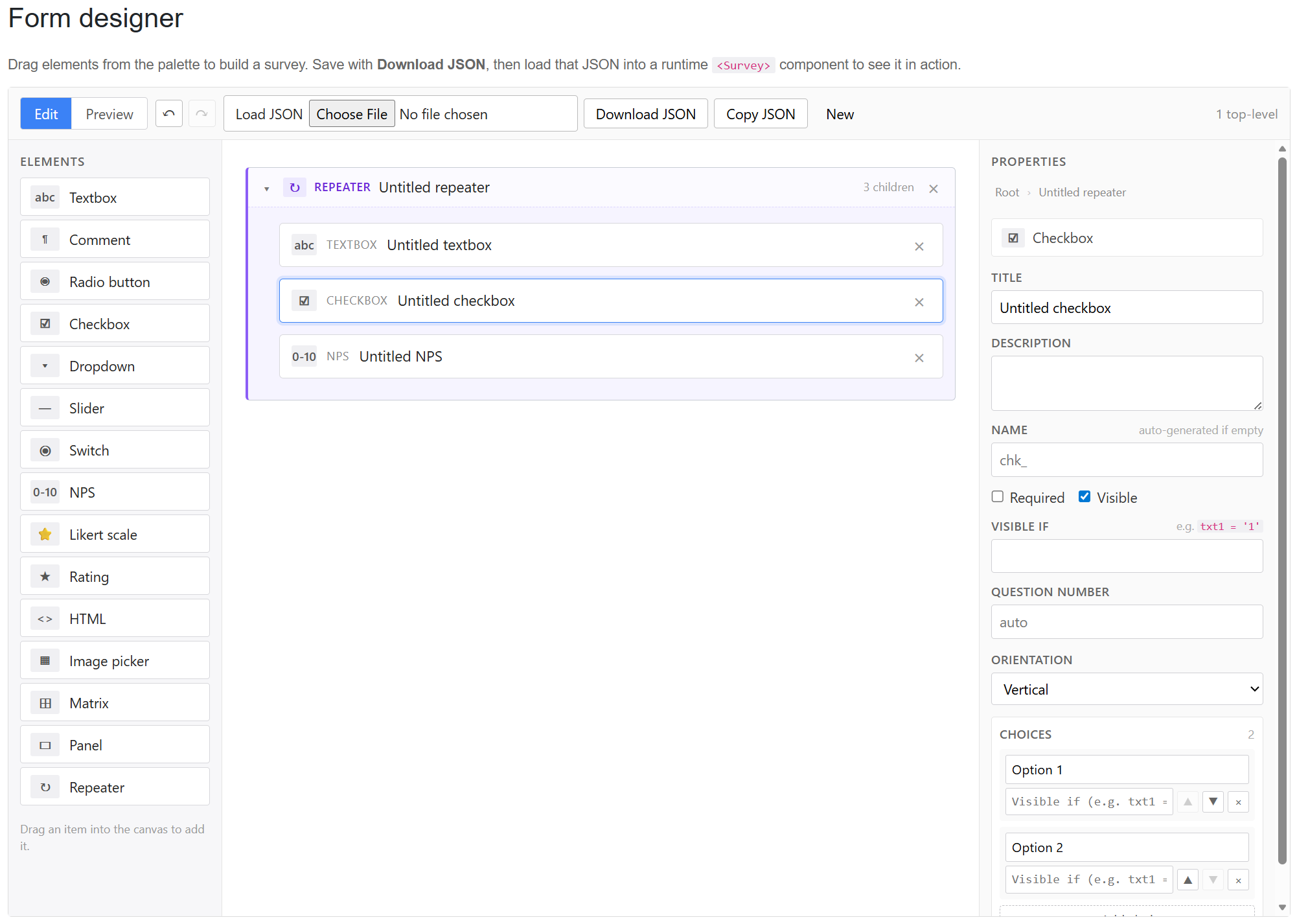
PSC.Blazor.Components.Survey.Design is a drop-in Razor component that gives you a complete form-builder UI:
<SurveyBuilder @bind-Form="_form" />
Three-pane layout: a palette of draggable element types on the left, a canvas in the middle, and a property inspector on the right.
What it does:
- Drag from the palette to add any of the 15 element types.
- Drag existing elements to reorder, or drag across containers to re-parent.
- Nested containers render recursively — Panels can hold Panels; Repeaters accept only leaf elements (matching the runtime’s template model). Invalid drops get a red “blocked” indicator before the user releases.
- Cycle prevention — dragging a container into its own subtree is rejected.
- Selection breadcrumb at the top of the inspector shows
Root › Panel › Textboxwith each step clickable. - Per-type property inspectors with full Choices editors for Radio/Check/Dropdown, Matrix row/column editors, Slider tick editors, Image picker editors with thumbnails, Panel colour picker, everything.
- Undo/redo via
Ctrl+Z/Ctrl+Ywith 100-snapshot history. Keyboard shortcuts forDelete(remove selected) andEscape(deselect). - Preview tab renders the actual runtime
<Survey>against a clone of the current form, wrapped in anErrorBoundaryso broken states (empty choices, badVisibleIf) surface a recoverable message instead of a stack trace. - Download / Load / Copy JSON — every form goes in and out as a
form.jsonfile.
The round-trip story means something concrete now: a product owner can design a survey in the builder, Download JSON, hand you the file, and you drop it in. Or the other way — give them a stub form.json, they modify it visually, send it back, you commit it.
Bulk import: CSV, Excel, JSON
Forms aren’t only about collecting answers. Sometimes you already have the answers and you need them inside the system.
Three companion packages handle that:
- PSC.Survey.Shared.Imports.CSV — generates a CSV template from a form, parses uploaded CSVs into typed
ElementValuelists, validates every row against the schema. - PSC.Survey.Shared.Imports.Excel — same API, reads
.xlsxnatively (no Excel install required). - PSC.Survey.Shared.Imports.Json — loads answer payloads that might come from an API, a webhook, or another system entirely.
All three share a continue-on-error mode that returns a structured error report instead of stopping at the first bad row — essential for data migrations where you’d rather import 95% and fix the rest than import 0%.
Where to get it
The runtime component, the designer, and all three importers are available as individual NuGet packages with annual renewable licences, a bundled compiled suite licence covering all five packages, or the full source code.
Shop: flnk.it/shop/pscshop
Live demo: survey.puresourcecode.com — every element type has its own page with live code, the generated JSON, and the rendered form side by side. The visual designer is on the Form designer tab.
What’s next
A few things on the roadmap:
- Lint pass — a “Validate form” button on the designer that flags empty choices, unreferenced
VisibleIfvariables, and duplicate custom names before a form goes live. - Debounced undo — coalesce keystroke-level snapshots into word-level so
Ctrl+Zdoesn’t unwind one character at a time in long titles. - Localisation for the designer UI — the runtime already has EN/IT/ES resource bundles for user-facing strings; the builder’s chrome is English-only at the moment.
Happy to hear what you’d use this for — the best backlog for a component library is the one your users write for you.