With .NET 10, there are very good improvements in the APIs using OpenAPI. In this post, I want to show you how replacing Swagger with Scalar in ASP.NET Core can improve your experience in dealing with APIs.
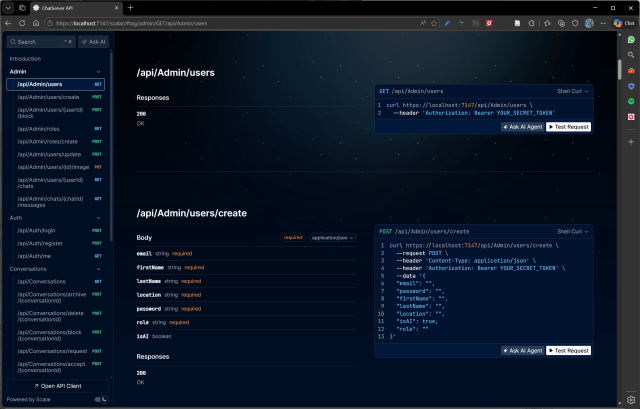
Why Scalar?
Scalar is a modern API reference UI that consumes a standard OpenAPI document. It replaces both Swashbuckle’s document generator and the Swagger UI in a single, cleaner setup. .NET 9/10 ships a built-in OpenAPI document generator (Microsoft.AspNetCore.OpenApi) that Scalar can use directly, removing the Swashbuckle dependency entirely.
Update the .csproj
Remove Swashbuckle.AspNetCore and add the two packages you need:
<!-- Remove this -->
<PackageReference Include="Swashbuckle.AspNetCore" Version="10.x.x" />

<!-- Add these -->
<PackageReference Include="Microsoft.AspNetCore.OpenApi" Version="10.0.3" />
<PackageReference Include="Scalar.AspNetCore" Version="2.12.52" />
Microsoft.AspNetCore.OpenApi is the built-in .NET document generator. Scalar.AspNetCore provides the UI middleware and its configuration API.
Register OpenAPI in Program.cs
Replace AddSwaggerGen(...) with AddOpenApi(...).
Basic call (no auth)
builder.Services.AddEndpointsApiExplorer(); // still needed for controller-based APIs
builder.Services.AddOpenApi("v1");
The string "v1" is the document name — it determines the URL the spec is served at: /openapi/v1.json.
With a document transformer
A document transformer is a delegate that runs once when the OpenAPI document is first requested. Use it to set metadata and inject the JWT security scheme:
builder.Services.AddOpenApi("v1", options =>
{
    options.AddDocumentTransformer((document, context, cancellationToken) =>
    {
        // ── API metadata ──────────────────────────────────────────────
        document.Info = new Microsoft.OpenApi.OpenApiInfo
        {
            Title = "ChatServer API",
            Version = "v1",
            Description = "Standalone API for Birkbeck Chat"
        };

        // ── Bearer security scheme ────────────────────────────────────
        // Components and SecuritySchemes are null until explicitly initialised.
        document.Components ??= new Microsoft.OpenApi.OpenApiComponents();
        document.Components.SecuritySchemes ??=
            new Dictionary<string, Microsoft.OpenApi.IOpenApiSecurityScheme>();

        document.Components.SecuritySchemes["Bearer"] =
            new Microsoft.OpenApi.OpenApiSecurityScheme
            {
                Type        = Microsoft.OpenApi.SecuritySchemeType.Http,
                Scheme      = "bearer",   // must be lowercase "bearer"
                BearerFormat = "JWT",
                Description = "Enter your JWT token (without the 'Bearer ' prefix)"
            };

        // ── Attach security requirement to every endpoint ─────────────
        // This makes the padlock icon appear on all operations in the UI.
        if (document.Paths is not null)
            foreach (var path in document.Paths.Values)
                if (path.Operations is not null)
                    foreach (var operation in path.Operations.Values)
                    {
                        // Security list is also null until initialised.
                        operation.Security ??=
                            new List<Microsoft.OpenApi.OpenApiSecurityRequirement>();

                        operation.Security.Add(
                            new Microsoft.OpenApi.OpenApiSecurityRequirement
                            {
                                // OpenApiSecuritySchemeReference links the requirement
                                // back to the named scheme defined in Components above.
                                [new Microsoft.OpenApi.OpenApiSecuritySchemeReference(
                                    "Bearer", document)] = []
                            });
                    }

        return Task.CompletedTask;
    });
});
Why all the null checks?
In Microsoft.OpenApi v3 (used by Microsoft.AspNetCore.OpenApi 10.x), most collections on the model objects (SecuritySchemes, Operations, Security) are not initialised by their constructors — they start as null. Using the ! null-forgiving operator only silences the compiler; it does not prevent a NullReferenceException at runtime. Explicit ??= initialisation and is not null guards are required.
Configure the middleware
Replace app.UseSwagger() / app.UseSwaggerUI() with:
if (app.Environment.IsDevelopment())
{
    // Serves the raw OpenAPI JSON at /openapi/v1.json
    app.MapOpenApi();

    // Mounts the Scalar UI at /scalar/v1 (default route)
    app.MapScalarApiReference(options =>
    {
        options
            .WithTitle("ChatServer API")
            .WithTheme(ScalarTheme.BluePlanet)
            .AddPreferredSecuritySchemes("Bearer")
            .AddHttpAuthentication("Bearer", http => { });
    });
}
Scalar option explanations
| Option | What it does |
|---|---|
WithTitle(...) |
Sets the page title shown in the browser tab and at the top of the UI |
WithTheme(ScalarTheme.X) |
Visual theme. Options: Default, BluePlanet, Mars, Saturn, Kepler, Moon, Purple, Solarized, DeepSpace, None |
AddPreferredSecuritySchemes("Bearer") |
Pre-selects the Bearer scheme in the authentication panel so the user does not have to pick it manually |
AddHttpAuthentication("Bearer", http => { }) |
Tells Scalar this scheme is HTTP Bearer auth. The lambda can optionally pre-fill a default token: http.Token = "..." |
Note on deprecated APIs: In Scalar versions before 2.x, these were called
WithPreferredSchemeandWithHttpBearerAuthentication. Both are now marked[Obsolete]. UseAddPreferredSecuritySchemesandAddHttpAuthenticationinstead.
How authentication works in the UI
- Open
https://localhost:{port}/scalar/v1 - Click the “Authenticate” button (top right)
- A panel opens showing the Bearer scheme
- Paste your JWT token — without the
Bearerprefix - Click Save
- All subsequent “Send” requests will include
Authorization: Bearer <your-token>automatically
To get a token, use the POST /api/auth/login endpoint (which is marked [AllowAnonymous] and therefore works without a token).
Full Program.cs block for reference
using Scalar.AspNetCore;

// ── Service registration ──────────────────────────────────────────────────
builder.Services.AddControllers();
builder.Services.AddEndpointsApiExplorer();
builder.Services.AddOpenApi("v1", options =>
{
    options.AddDocumentTransformer((document, context, cancellationToken) =>
    {
        document.Info = new Microsoft.OpenApi.OpenApiInfo
        {
            Title   = "My API",
            Version = "v1"
        };

        document.Components ??= new Microsoft.OpenApi.OpenApiComponents();
        document.Components.SecuritySchemes ??=
            new Dictionary<string, Microsoft.OpenApi.IOpenApiSecurityScheme>();
        document.Components.SecuritySchemes["Bearer"] =
            new Microsoft.OpenApi.OpenApiSecurityScheme
            {
                Type         = Microsoft.OpenApi.SecuritySchemeType.Http,
                Scheme       = "bearer",
                BearerFormat = "JWT",
                Description  = "Enter your JWT token"
            };

        if (document.Paths is not null)
            foreach (var path in document.Paths.Values)
                if (path.Operations is not null)
                    foreach (var operation in path.Operations.Values)
                    {
                        operation.Security ??=
                            new List<Microsoft.OpenApi.OpenApiSecurityRequirement>();
                        operation.Security.Add(
                            new Microsoft.OpenApi.OpenApiSecurityRequirement
                            {
                                [new Microsoft.OpenApi.OpenApiSecuritySchemeReference(
                                    "Bearer", document)] = []
                            });
                    }

        return Task.CompletedTask;
    });
});

// ── Middleware ────────────────────────────────────────────────────────────
if (app.Environment.IsDevelopment())
{
    app.MapOpenApi();                        // /openapi/v1.json
    app.MapScalarApiReference(options =>
    {
        options
            .WithTitle("My API")
            .WithTheme(ScalarTheme.BluePlanet)
            .AddPreferredSecuritySchemes("Bearer")
            .AddHttpAuthentication("Bearer", http => { });
    });                                      // /scalar/v1
}
Key differences from Swashbuckle
| Swashbuckle | Microsoft.AspNetCore.OpenApi + Scalar | |
|---|---|---|
| Doc generation | AddSwaggerGen() |
AddOpenApi() |
| UI | UseSwaggerUI() |
MapScalarApiReference() |
| Spec endpoint | /swagger/v1/swagger.json |
/openapi/v1.json |
| UI endpoint | /swagger |
/scalar/v1 |
| Security scheme | c.AddSecurityDefinition(...) |
Document transformer |
| Security requirement | c.AddSecurityRequirement(...) |
Document transformer |
[AllowAnonymous] filtering |
Optional filter class | Not automatic — the padlock icon appears on all endpoints, but anonymous ones still work without a token |
Common pitfalls
NullReferenceException on SecuritySchemes
new OpenApiComponents() does not initialise SecuritySchemes. Always use ??= before indexing:
document.Components ??= new Microsoft.OpenApi.OpenApiComponents();
document.Components.SecuritySchemes ??=
    new Dictionary<string, Microsoft.OpenApi.IOpenApiSecurityScheme>();
document.Components.SecuritySchemes["Bearer"] = ...
NullReferenceException on Operations or Security
Both are null on freshly built path/operation objects. Guard with is not null and ??=:
if (path.Operations is not null)
    foreach (var operation in path.Operations.Values)
    {
        operation.Security ??= new List<Microsoft.OpenApi.OpenApiSecurityRequirement>();
        operation.Security.Add(...);
    }
?? / ??= type mismatch compiler errors
SecuritySchemes is typed as IDictionary<string, IOpenApiSecurityScheme> (interface), not Dictionary<string, OpenApiSecurityScheme> (concrete). Use the interface type when initialising:
// Correct
document.Components.SecuritySchemes ??=
    new Dictionary<string, Microsoft.OpenApi.IOpenApiSecurityScheme>();

// Wrong — type mismatch
document.Components.SecuritySchemes ??=
    new Dictionary<string, Microsoft.OpenApi.OpenApiSecurityScheme>();
Obsolete Scalar APIs (versions before 2.x)
| Deprecated | Replacement |
|---|---|
WithPreferredScheme("Bearer") |
AddPreferredSecuritySchemes("Bearer") |
WithHttpBearerAuthentication(...) |
AddHttpAuthentication("Bearer", ...) |
Configuration
The UI provides menus, including the Configure option. Here it is possible to customise the layout, theme and appearance. Also, it is possible to export the configuration.

Scalar offers the option to share the API definition with others in one click. It also allows you to publish the definition in a common space in the Scalar registry.
Wrap up
Replacing Swagger with Scalar in ASP.NET Core is quite straightforward, and I show how to do it in this post. We can add the authentication that protects the APIs from unauthorised calls.