


The integration with Xero seems quite complicate. I explained in my previous post, how to create the token to integrate your application with Xero. Now, I’m going to explain the code for getting invoice list from Xero in C# applications.
My goal is to have a package for a Xero Connector with basic functionalities. So, I can use it and share it. The functionalities I want to have are:
- Get invoices
- Search an invoice
- Get an invoice as PDF
- Create a client/customer
- Create an invoice
- Refresh the access token
With these basic functionalities, I will have the ability to satisfied most of the client requests. It is time to start.
Start with Postman
First, take a look at the Postman collection that Xero provides. If you have the access token as I explained in the previous post, you are be able to have from Xero a list of invoices for your company.
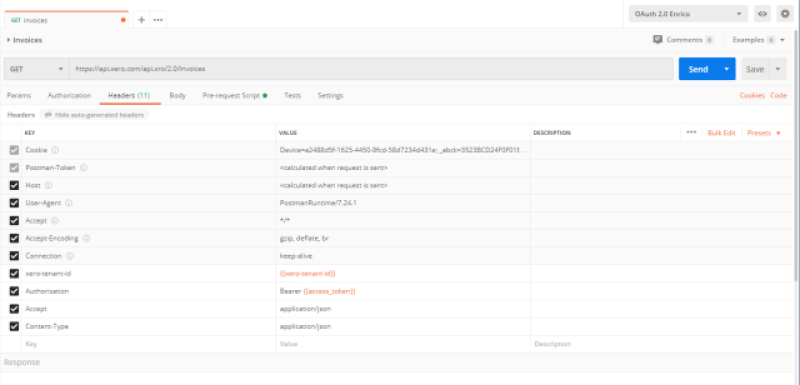
With Postman I can verify the Access Token is valid and what kind of response I receive from the Xero API.
So, from the json or from the Xero documentation, I can create the response model for invoices and I’m going to call it XeroInvoiceResponse. Invoice is the class create from the json. Look on GitHub.
/// <summary>
/// Class XeroInvoiceResponse.
/// </summary>
/// <seealso cref="PiP.Accounting.Models.Responses.XeroBaseResponse" />
public class XeroInvoiceResponse : XeroBaseResponse
{
    /// <summary>
    /// Gets or sets the invoices.
    /// </summary>
    /// <value>The invoices.</value>
    [JsonProperty("Invoices")]
    public IList<Invoice> Invoices { get; set; }
}
Let’s code
From Postman I have create the response from the Xero API. So, when I’ll receive the data from Xero, I can convert them in a model I can easily use in the project. Also, I want to create my response. So, I can return from the function the data I need plus some extra information. I’m going to call this model InvoiceResponse.
/// <summary>
/// Class InvoiceResponse.
/// </summary>
public class InvoiceResponse : BaseResponses
{
    /// <summary>
    /// Gets or sets the invoices.
    /// </summary>
    /// <value>The invoices.</value>
    [JsonProperty("Invoices")]
    public IList<Invoice> Invoices { get; set; }

    /// <summary>
    /// Gets or sets the content.
    /// </summary>
    /// <value>The content.</value>
    [JsonProperty("Content")]
    public byte[] Content { get; set; }
}
Ignore for now Content. I’ll use that field when I want to retrieve a PDF from the invoice. Invoice is the same as the XeroInvoiceResponse.
With the RestSharp I call the Xero API. In the header of the request, I have to pass the Access Token that I created in Postman (see my post) and the Tenand Id (see the other post for that).
/// <summary>
/// Gets the invoices.
/// </summary>
/// <returns>InvoiceResponse.</returns>
public InvoiceResponse GetInvoices()
{
    InvoiceResponse rtn = new InvoiceResponse();

    var _client = new RestClient("https://api.xero.com/api.xro/2.0/Invoices");
    _client.Timeout = -1;

    var request = new RestRequest(Method.GET);
    request.AddHeader("Authorization", "Bearer " + _settings.AccessToken);
    request.AddHeader("xero-tenant-id", _settings.TenandId);
    var response = _client.Execute<XeroInvoiceResponse>(request);

    rtn.HttpStatusCode = response.StatusCode;
    rtn.Status = (int)response.StatusCode == 200 ?
                      PSC.Common.Enums.ResponseStatus.Success :
                      PCS.Common.Enums.ResponseStatus.Failed;
    if (response.StatusCode == System.Net.HttpStatusCode.OK)
        rtn.Invoices = response.Data.Invoices;

    return rtn;
}
So, let me explain few things although the code I think is clear. _client.Execute is calling the endpoint and passing the header and parameters. Then, Xero API returns something: the HttpStatusCode tells us if the call has had success or not (200 is OK). I translate this status in my internal status.
If the result is OK, I put all invoices from Xero to my InvoiceResponse.
Happy coding!


[…] Get invoices […]